








Scam text messages tricked one rideshare user into losing £90,000 in just three days after clicking a single link. These messages aim to steal personal information, including passwords, account numbers, and Social Security details. Fake text messages often impersonate government agencies, banks, or delivery companies to catch recipients off guard. Scammers use urgent language, claiming accounts have been hacked or demanding immediate action to pressure people into responding. In essence, legitimate organisations never request sensitive information via spam text. This article reveals the warning signs of scam messages, explains what to do when receiving scammer text messages, and shows how to report scam websites and protect others from these threats.
What Scam Text Messages Look Like in 2026
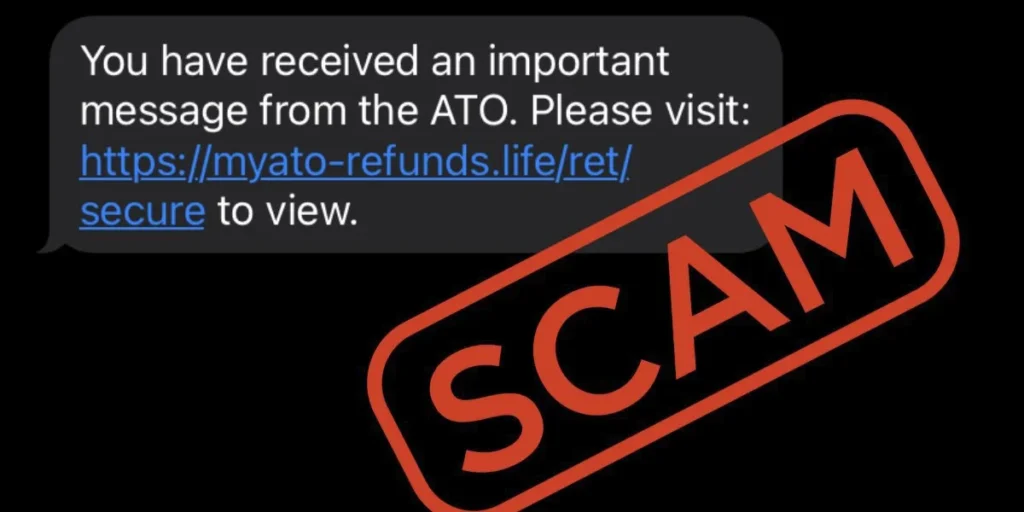
Package delivery scams accounted for over 26% of all spam text in recent years, with fraudsters impersonating USPS, FedEx, and similar services. These fake text messages claim a delivery was missed, requires rescheduling, or demands payment for shipping fees. The messages create urgency by stating packages will be returned unless recipients click embedded links and provide personal information. USPS will not send customers text messages containing links unless a customer first requests the service using a tracking number. Scammers send these messages to thousands of recipients simultaneously, profiting even when only one person clicks.
Fake Delivery Notifications and Package Alerts
Delivery notification scams typically state there’s an issue with a package, an unpaid shipping fee, or a need to verify the postcode within 48 hours. Messages appear to come from Australia Post, DHL, or Amazon, requesting recipients to update delivery details or pay customs fees. The links redirect to fraudulent websites designed to harvest personal and banking information. Messages may also appear in the same conversation thread as legitimate delivery updates, making them harder to detect.
Bank Account and Payment Scam Messages
Bank impersonation scams resulted in over £20 million in losses from 14,603 reports in 2022, with average losses reaching £22,000. These scammer text messages claim that unusual activity occurred on accounts, that cards have been compromised, or that payments failed. The texts appear in existing message threads alongside genuine bank communications. Fraudsters request personal information, security codes, or instruct recipients to transfer money to ‘keep it safe’. Banks never ask customers to transfer funds or provide one-time security codes over the phone.
Prize and Gift Card Spam Text Schemes
Prize scams promise vouchers from well-known companies, lottery winnings, or gift cards worth substantial amounts. Recipients receive codes to enter on websites that redirect to secondary sites requesting mobile numbers. Entering this information may subscribe victims to expensive premium SMS services. Legitimate lotteries never require upfront fees, taxes, or bank account details to collect winnings.
Government Agency Impersonation Texts
Government impersonation scams extracted over £1.2 million from more than 7,100 reports. Scammers pose as the IRS, Social Security Administration, or Medicare, threatening arrest, benefit suspension, or demanding immediate tax payments. The messages create fear by claiming warrants exist or penalties will apply. Government agencies never contact people via text to demand money or threaten legal action.
Job Offer and Money-Making Scam Messages
Job scam texts promise high earnings for minimal effort, typically for remote work rating apps or completing simple tasks. The hiring process occurs entirely via text, without proper interviews or verification. Victims receive small initial payments to build trust before being asked to pay fees to unlock higher earnings or withdraw funds.
Account Verification: Fake Text Messages
Verification scams send fake two-factor authentication codes or claim accounts have been locked. The messages request password resets through fraudulent links that capture login credentials. Scammers spoof legitimate companies like Netflix, PayPal, or Amazon, creating a sense of urgency to prevent a supposed account suspension.
Warning Signs That Reveal a Scam Text Message

Recognising scam text messages requires attention to specific patterns that fraudsters use repeatedly. These warning signs appear across all types of spam text, making them reliable indicators of fraudulent activity.
Urgent Language and Pressure Tactics
Scammers manufacture urgency through threats and promises to bypass rational thinking. Negative urgency claims include accounts being hacked, warrants for arrest, or suspicious login attempts. Positive urgency offers prizes, exclusive deals, or gifts expiring within hours. Messages demand immediate action to avoid penalties or secure benefits. Legitimate banks, government agencies, and major corporations never communicate this way. The fabricated time pressure aims to trigger emotional responses, causing recipients to act before verifying legitimacy.
Suspicious Links and Strange Web Addresses
URLs containing random letter-number combinations, unusual endings such as .xyz instead of .com, or bit. ly-shortened links signal fraud. Scammers sometimes request specific steps to activate fraudulent links, working around protective measures that automatically deactivate links from unknown sources. Hover functionality on mobile devices doesn’t reveal destinations as it does with email, making malicious links harder to spot. Some attackers use legitimate-sounding elements, such as ‘.gov.au’, in URLs to confuse recipients.
Requests for Personal or Financial Information
Fake text messages ask for passwords, account numbers, credit card details, Social Security numbers, or two-factor authentication codes. Legitimate organisations never request sensitive information via text. Scammers may ask recipients to confirm banking details, verify identity through links, or provide account recovery codes. Government agencies won’t demand money or personal details through messages.
Messages Appearing in Legitimate Text Threads
Scammers exploit the limitations of SMS technology by spoofing sender IDs, causing fraudulent messages to appear in existing conversation threads with legitimate organisations. Application-to-person messaging allows attackers to enter any text in the sender ID field, which phones use to group messages. Recipients see scammer text messages alongside genuine communications from banks or delivery services, making detection particularly difficult.
Related Article: The Master Blueprint: A Step-by-Step Guide to Digital Account Recovery
What to Do When You Receive a Spam Text
Receiving a spam text requires immediate protective action without engaging the sender.
Don’t Click, Reply, or Engage with the Message
Never respond to suspicious texts, including requests to text ‘STOP’. Replying confirms the number is active, subsequently increasing spam messages and calls. Clicking links can install malware, spyware, or Trojans on devices. Avoid opening attachments or providing data to any of the websites mentioned.
Verify Through Official Channels Independently
Contact organisations directly using known phone numbers or independently found websites, not via message links. Access digital banking exclusively from official apps or by navigating directly to websites. Search for company websites through search engines rather than clicking links in messages.
Block the Number and Delete the Scam Message
On iPhone, tap the sender’s number, select the info icon, then choose Block this Caller. On Android, open the message, tap the three-dot icon, and select Block number or Block & report spam. Delete spam messages immediately after blocking.
Enable Built-in Spam Filtering on Your Phone
iPhone users should enable “Unknown Senders” in Settings > Messages. Android users can activate spam protection in Google Messages settings. These filters automatically detect known spam patterns and suspicious links.
Use Your Wireless Provider’s Blocking Tools
T-Mobile’s Scam Shield blocks scam calls and texts through the T-Life app. Verizon Call Philtre blocks robocalls and spam messages. Wireless carriers use backend technology to identify and block spam messages before delivery.
How to Report Scam Text Messages and Protect Others

Reporting scam text messages helps authorities identify patterns and protect the wider community from fraud.
Forward Suspicious Messages to 7726 (SPAM)
Forward spam text directly to 7726, which spells ‘SPAM’ on alphanumeric keypads. This free service alerts wireless providers to investigate and potentially block malicious numbers. Most UK and US mobile networks support this reporting method. Touch and hold the message bubble, tap Forward, enter 7726, and send without clicking any links within the scammer text message.
Report Through Your Messaging App
iPhone users can tap the sender’s contact icon and select Report Junk within the Messages app. Android users touch and hold a conversation, then tap Block, followed by Report spam. These reports help Apple and Google calibrate spam filters across their platforms.
File a Report with the FTC at ReportFraud.ftc.gov
The FTC shares reports with over 2,000 law enforcement agencies. Investigators use submitted information to build cases against scammers and detect patterns of wrongdoing. Reports cannot resolve individual complaints but contribute to broader investigations and prosecutions. Filing takes minutes at ReportFraud.ftc.gov.
Document and Share Scammer Text Message Examples with Family
Talk to family members about suspicious messages received. Sharing scam examples helps others recognise similar threats. Since scammers don’t target just one person, discussing these messages with relatives reduces their vulnerability to identical schemes.
Conclusion – Scam Text Messages
Scam text messages continue to evolve, but the warning signs remain consistent. Urgent language, suspicious links, and requests for personal information reveal fraudulent intent. Above all, never clicking links or engaging with unknown senders provides the strongest defence. Reporting suspicious messages to 7726 protects the broader community from these threats. Armed with this knowledge, readers can confidently identify scammer text messages, safeguard their personal information, and help others avoid falling victim to these increasingly sophisticated schemes.
How can I tell if a text message is a scam?
Look for urgent language pressuring you to act immediately, suspicious links with unusual web addresses, and requests for personal or financial information. Legitimate organisations never ask for passwords, account numbers, or security codes via text message. Be especially wary of messages claiming your account has been compromised or offering prizes that seem too good to be true.
What should I do if I receive a suspicious text message?
Never click any links, reply, or engage with the message in any way. Block the sender’s number immediately and delete the message. If you need to confirm the message’s authenticity, contact the agency directly using a phone number or website you found on your own—never use contact information supplied in the suspicious text.
What are common types of scam text messages in 2026?
The most common scam texts include fake delivery notifications claiming missed packages, bank alerts about suspicious account activity, prize and gift card offers, government agency impersonation messages, job offers promising easy money, and account verification requests. Package delivery scams account for over 26% of all spam texts.
Why do scam messages sometimes appear in my legitimate text threads?
Scammers exploit SMS technology by spoofing sender IDs, which causes their fraudulent messages to appear in existing conversation threads with legitimate organisations. This happens because phones group messages based on the sender ID field, which attackers can manipulate to make their texts appear alongside genuine communications from banks or delivery services.
How can I report scam text messages to help protect others?
Forward suspicious messages directly to 7726 (which spells ‘SPAM’), a free service that alerts wireless providers to investigate and block malicious numbers. You can also file a report through your messaging app’s built-in features or at ReportFraud.ftc.gov. These reports help authorities identify patterns and protect the wider community from fraud.